
M2250 Series appliance
The Ivanti EPMM appliance is a tightly integrated hardware, OS, application, and database solution that is built, optimized, and certified by Ivanti . The M2250 appliance ships with either Ivanti EPMM 10.1.0.0 or Ivanti Sentry 9.5 preinstalled. The following table lists the M2250 appliance specifications.
Table: Ivanti EPMM M2250 Series appliance specifications
| | |
|---|---|---|
Operating environment | Processor | 3.8 GHz Intel E3-1275 v6 CPU |
Memory | 32 GB | |
Drives | 2 x 600 GB Hot-swap SAS3 12 GB/s SAS HW RAID | |
Chassis | Form Factor | 19” 1U Rackmount |
Dimensions (D x H x W) | 19.8” x 1.7” x 17.2” (503 mm x 43 mm x 437 mm) | |
Weight | 32 lbs (16.5 kg) | |
Front panel | Buttons | Power On/Off System Reset |
LEDs | Power LED Hard Drive Activity LED 2x Network Activity LED System Overheat LED | |
USB | 2x USB Ports | |
Drives | 600 GB Hot swap SAS 12.0 GB Hard Drives (RAID1) 1x Slim DVD Drive | |
Back panel | IPMI | Intelligent Platform Management Interface (IPMI) 2.0 with virtual media over LAN and KVM-over-LAN support; 1x 10/100BASE-T (RJ45) |
Ethernet | 2x 10/100/1000BASE-T (RJ45) | |
VGA | 1x VGA (DB15) | |
USB | 4x USB Ports | |
Serial | 1x Serial port (DB9) | |
Power supply | Power | 400W (1+1) Redundant Gold-level power supply with PMBus and I2C |
Voltage | 100 – 240V, 50-60Hz, 6-3A +5V standby: 3A +12V: 33A +5V: 25A -12V: 0.6A | |
Connector | IEC 60320-C13 | |
Operating environment | Operating | Temperature: 50°F to 95°F (10°C to 35°C) Relative Humidity: 8% to 90% (non-condensing) Approximate maximum heat dissipation under normal operation based on Ivanti EPMM’s configuration: 1262 BTU/hr |
Non-Operating | Temperature: -40° to 158°F (-40° to 70°C) Relative Humidity: 5% to 95% (non-condensing) |
M2250: front panel
The following figure, key, and LED table describe the M2250 front panel.
Figure: M2250 front panel
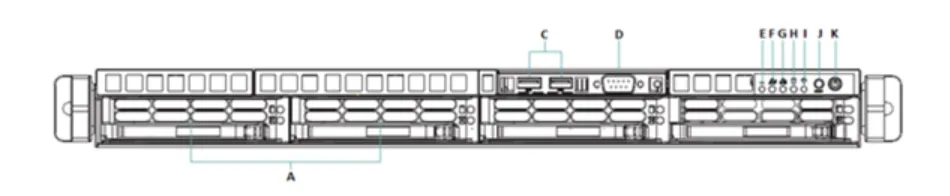
M2250 front panel key:
- 600G HDDs
- n/a
- USB ports
- Serial port
- Informational LED
- NIC-2 Activity LED
- NIC-1 Activity LED
- HDD Activity LED
- Power LED
- Reset button
- Power button
Table: Informational LED Fields
LED status | Description |
|---|---|
Solid red | An overheat condition has occurred. This may be caused by cable congestion. |
Blinking red (1Hz) | A fan failure has occurred. Check for an inoperative fan. |
Blinking red (0.25Hz) | A power failure has occurred. Check for a non-operational power supply |
Solid blue | Location UID has been activated. Use this function to locate the server in a rack-mount environment. |
Blinking blue (300 msec) | Remote UID is on. Use this function to identify the server from a remote location. |
M2250: back panel
The following figure and key describe the M2250 back panel.
Figure: M2250 back panel

M2250 back panel key:
- Power supply
- Power supply
- COM port
- IPMI LAN
- USB ports
- USB ports
- LAN1 port
- LAN2 port
- VGA port