
Unified Navigation for Ivanti Access
2 min
Switching between Ivanti applications using the Neurons App Switcher
The App Switcher lets you move between the Ivanti applications linked to your tenant without opening separate URLs. It is available for all Ivanti Access tenants. The applications listed depend on the products linked to your tenant. If no other applications are linked, only Ivanti Access is listed.
Prerequisites
Ensure that the applications are linked to the same tenant and that your administrator account exists in each of them.
Procedure
- Click the Neurons App Switcher icon
 in the Ivanti Access administrative portal. The list of available applications appears.
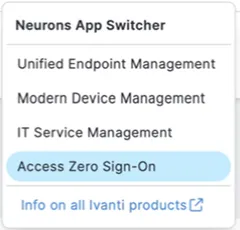
- Select the application you want to open. The application opens in the same browser session. You don’t need to sign in again.
To access other Ivanti products, such as Ivanti Neurons for Unified Endpoint Management, Ivanti Neurons for MDM, or Ivanti Neurons for ITSM, contact Ivanti Support.