
Authentication flow with Entra ID MFA
1 min
The following describes the authentication flow when a user signs in to a Microsoft application configured to use Ivanti Access as an external MFA provider.
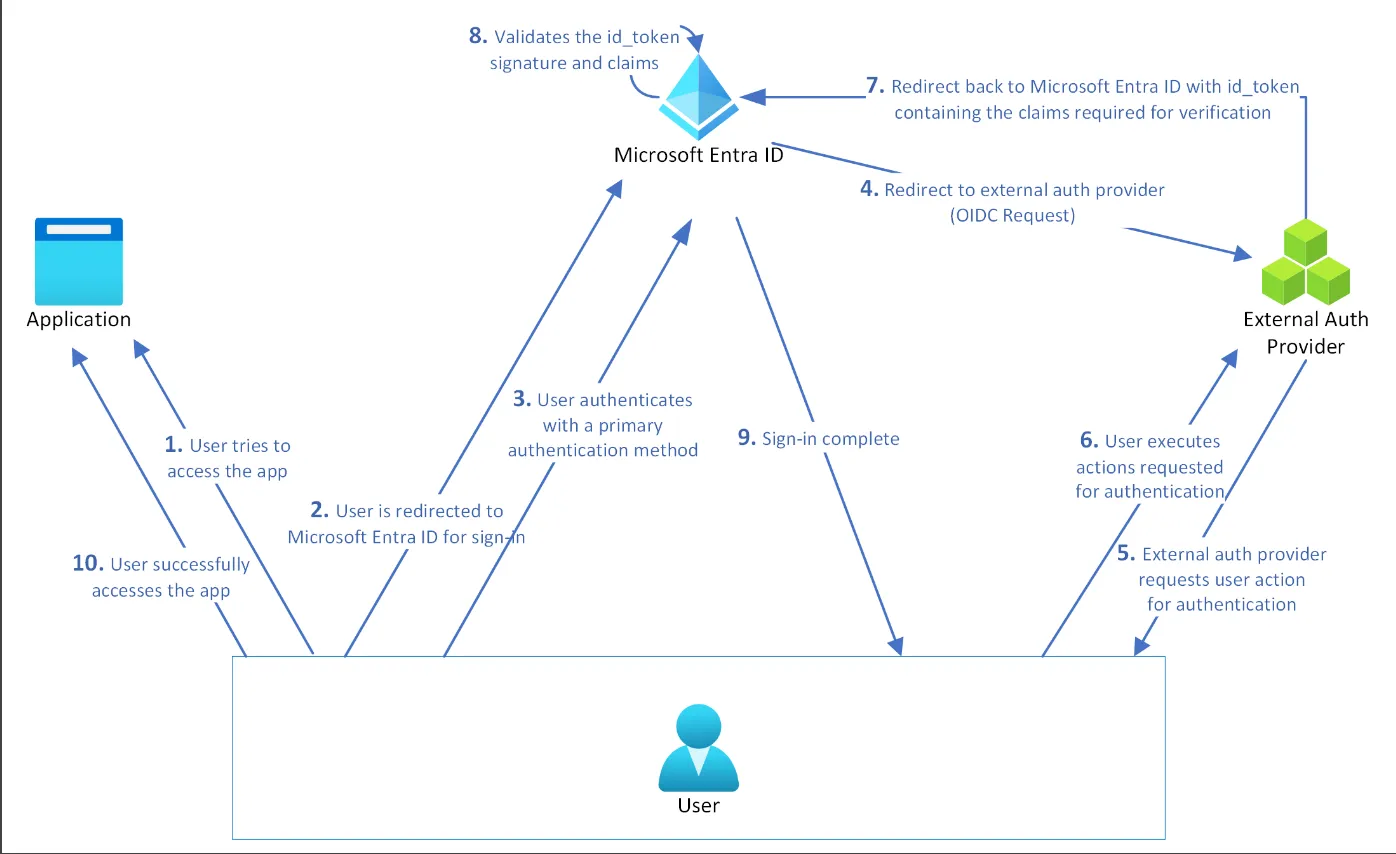
- A user attempts to access a Microsoft application.
- The user is redirected to Microsoft Entra ID for authentication.
- The user authenticates using the configured primary authentication method.
- Microsoft Entra ID redirects the user to Ivanti Access using an OpenID Connect (OIDC) request.
- Ivanti Access validates the request, evaluates the policy assigned to the Entra ID MFA integration, and prompts the user to authenticate using one of the configured methods:
- QR Code
- Push Notification
- One-Time Passcode (OTP)
- Tunnel Authentication
- The user completes the MFA challenge.
- Ivanti Access redirects the user back to Microsoft Entra ID with an id_token containing the claims required for verification.
- Microsoft Entra ID validates the id_token signature and claims.
- Microsoft Entra ID completes the sign-in process.
- The user successfully accesses the application.