
Configuring Ivanti Access in Ivanti Neurons for MDM
1 min
Set up Access on Ivanti Neurons for MDM.
Prerequisites
- Make a note of the URL for your Access instance, and the Access administrator username and password. The URL for your Access instance is one of the following:
- https://access-na1.mobileiron.com
- https://access-eu1.mobileiron.com
- Ensure that you have Manage Ivanti Access Integration role in Ivanti Neurons for MDM.
- You have the credentials for the Ivanti Access administrator account you will use to set up Ivanti Access in Ivanti Neurons for MDM. Ivanti recommends creating a separate administrator account in Ivanti Access that is specifically used for UEM integration with Ivanti Access. Ensure that the account does not have 2-step verification enabled.
Procedure
- In Ivanti Neurons for MDM, go to Admin > Access.
Figure 1. configure ivanti access on ivanti neurons for mdm
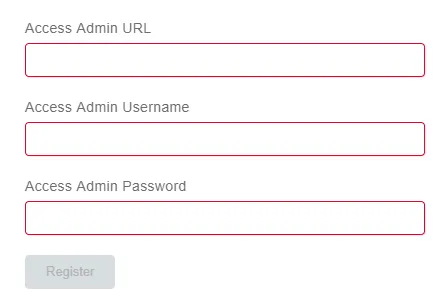
- Enter the following:
- Access Admin URL: URL for Access
- Access Admin Username: User name for the Access administrator account you created for Access integration.
- Access Admin Password
- Click Register. Ivanti Access is registered with Ivanti Neurons for MDM and the following displays:

Next steps
Related topics
See the Ivanti Neurons for MDM Guide for information about setting roles.