
Registering the security key for FIDO authentication
0 min
You must register the security key to use the key for FIDO authentication. With security key, you can securely sign-in to your work websites from any device.
Before you begin
- Verify that you have configured the user portal. For more information, see Configuring attribute mapping and migration in federation.
- Verify that you are logged into the user portal. For more information, see Logging into user portal
Procedure
- Login to the Ivanti User Home portal.
- In the Security Key section, click Register to register the security keys.
The Register Key window opens.
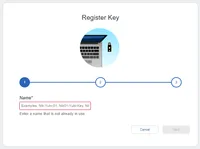
- Enter the name of the key. The name of the key must contain alpha numeric, hyphen and underscore. A space is not allowed in the key name.
- Continue with the process to complete the registration. You can now use this key to to sign-in to user portal and service providers.