
Changing the Password for Ivanti Neurons for MDM portal
After you initially sign in to the Ivanti Neurons for MDM administrative portal using the credentials provided, you may want to change the password. Your enterprise security policies may require you to change your password periodically.
When you attempt to enter a password for more than six times, the account is locked. You must wait for sometime to log in again.
I f you forget your password, click Forgot Password in the log in page. An email is sent to the user associated with the username with instructions to reset the password.
Procedure
| 1. | In the Ivanti Access administrative portal, click Account Settings > Change Password. |
|---|
The Change Password dialog appears.
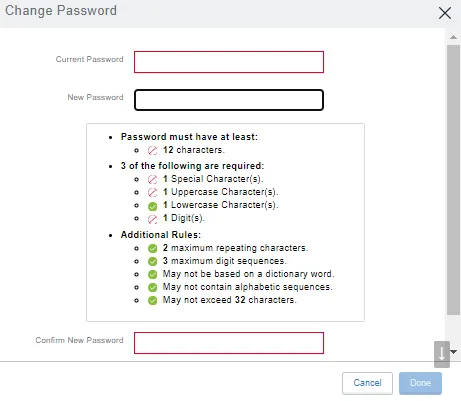
| 2. | For Current Password |
|---|
| 3. | For New Password |
|---|
| 4. | For Confirm New Password, |
|---|
| 5. | Click Done |
|---|