
Ruleset Management
Purpose
Ruleset Management keeps the Custom Rule Set, which provides the set of attack-detection rules that power vWAF based protection, up to date on every appliance without requiring a product upgrade or service restart. This ensures that the latest protection rules are automatically available across deployed systems.
Opening
To open Rule set Management, select the menu item Administration > Ruleset Management.
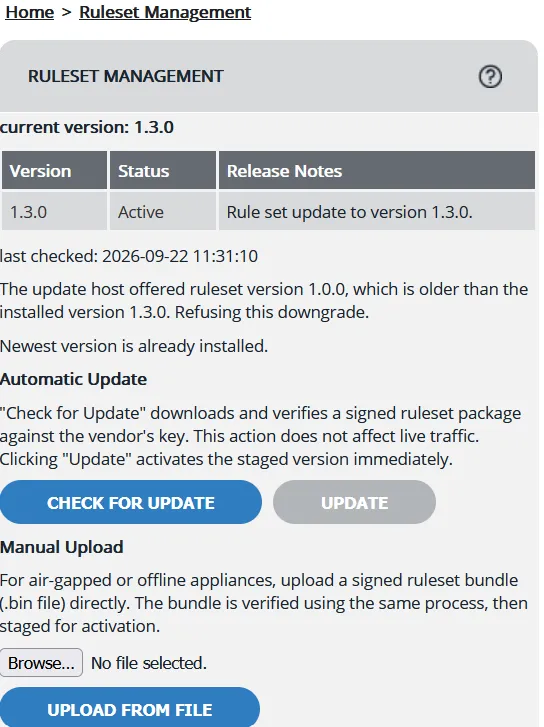
Information displayed
Element | Description |
|---|---|
Current Version | Displays the active ruleset version in the formatCurrent Version: <version>. If no ruleset has been installed or fetched, No update fetched yet is displayed. |
Versions Table | Lists locally retained ruleset versions with the following columns: Version, Status (Active, Staged, or Available), and Release Notes. Release notes are displayed in their original multi-line format. |
Last Checked | Displays the timestamp of the most recent update check in the format Last Checked: . If no update check has been performed, Never is displayed. |
Last Error | Displays a red error banner when the most recent operation fails. The banner is automatically cleared after the next successful update check. |
Update Information | Displays a temporary status message after Check for Update is performed, such as Version X staged. Click Update to activate. or Newest version is already installed. |
Automatic Update
Selecting Check for Update downloads and verifies a signed ruleset package against the vendor's signing key without affecting live traffic. Once verified, the package is staged for deployment. Selecting Update activates the staged ruleset immediately.
Manual Upload
For air-gapped or offline appliances, you can manually upload a signed ruleset bundle (.bin file). The appliance verifies the bundle using the same validation process as automatic updates and then stages it for activation.
- Only one version can be staged at a time, staging a new candidate does not require a prior applied version.
- Errors encountered during update operations, such as network failures, signature verification issues, product version incompatibilities, or rule validation failures, are displayed in the error banner using clear, user-friendly messages. Internal implementation details are not exposed.
- The version table displays all locally retained ruleset versions (by default, the five most recent versions plus the active version), allowing administrators to view available versions for reference even when they are not currently staged.