
Generating Usage Data for Billing
Introduction
Introduction
This page provides the ability to generate usage reports for tenant billing purposes. Each report contains a breakdown, per tenant, of the user counts in each service a tenant is entitled to use, calculated at the time the report is generated. You can generate a report immediately, set up a repeating schedule, or delete unneeded reports.
Release 22.8R1.4 includes new fields - start date, end date, advanced HTML5 licenses, and Gateway count.
Viewing the Usage Summaries Page
To access the usage summaries page:
- Log into MSP portal as an MSP Admin, see Logging into the MSP Portal.
- From the main menu, select Tenants > Usage Summary. The Usage Summaries page appears:
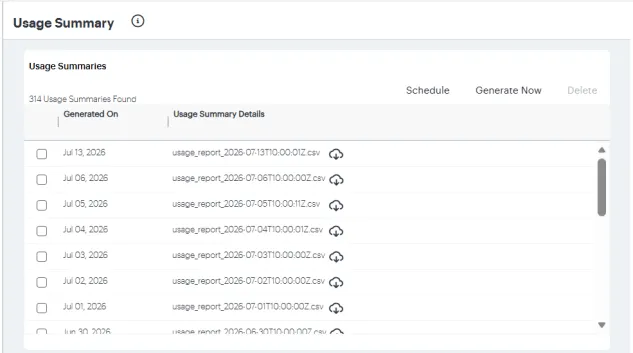
From this page, you can:
- To download a report, select the download icon adjacent to the report entry:
- View previously generated reports, and download each report as a CSV text file to your local workstation.

Sample report

- Delete one or more usage summary reports by selecting the check box adjacent to each applicable report entry, then selecting Delete.
- Generate a usage summary report immediately by selecting Generate Now.
- Schedule a regular report generation, see Scheduling a Usage Report Generation.
The report shows the subscription information, current license consumption and peak license consumption. The report does not include historical license consumption trends and historical daily utilization data.
Scheduling a Usage Report Generation
To set up a usage report schedule, or to cancel an existing schedule, select Schedule.
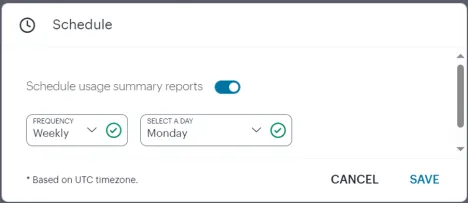
In this dialog, you can:
- Switch on or off scheduled reporting.
- Set a schedule duration based on a frequency of Daily, Weekly (with a selected day of the week), or Monthly (with a selected date in each month).
To apply your changes, select SAVE.