
Configuring the Application Pool Recycling Schedule
1 min
We recommend that you schedule the application pool recycling to occur at a specific time rather than at an interval. Setting a specific time lets you schedule the recycling for off-peak times when performance is least likely to be impacted.
To configure the application pool recycling schedule, do the following:
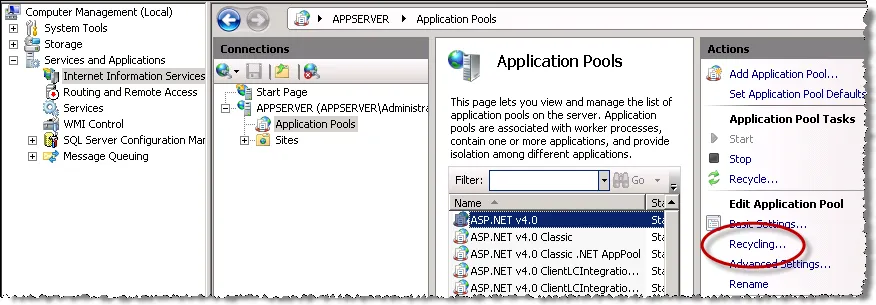
- Open the Computer Management panel by going to Start > Control Panel > Administrative Tools > Computer Management.
- In the Computer Management panel, double-click Services and Applications and double-click Internet Information Services (IIS).
- In the Connections panel, double-click Application Server and double-click Application Pools.
- In the list of application pools, highlight an application pool and click Recycling... located in the Edit Application Pool area.
Configuring the Application Pool Recycling Schedule
- In the Recycling Conditions dialog box, check Specific time(s) and specify an off-hours time for the recycling to occur.
- Repeat step 4 and step 5 to specify recycling schedules for the other application pools.