
System Manager Workspace
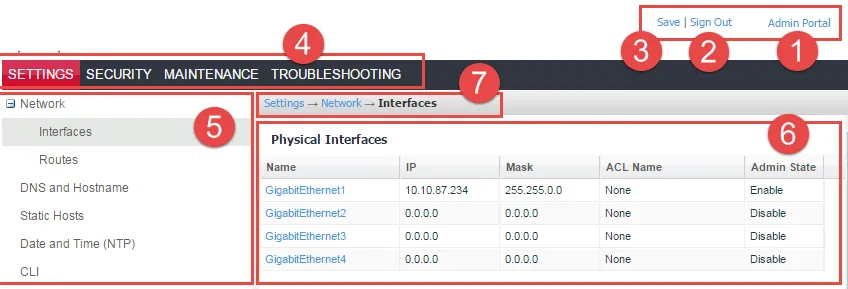
System Manager is a web-based portal where you can perform most configuration tasks. When you log into System Manager, you are presented with the System Manager workspace, which has the following components (the number listed below correspond to the numbers in System Manager workspace):
- Admin Portal link: opens the Admin Portal.
- Sign Out button: exits System Manager and automatically retain (but does not save) current settings, however, rebooting Ivanti EPMM without saving settings returns Ivanti EPMM to its previously-saved configuration.
- Save button: saves current settings.
- Menu tabs: lists the top-level System Manager functionality.
- Menu items pane: lists each item associated with the selected menu.
- Menu item details pane: lists the detailed functionality and options for the selected menu item.
- Menu item(s) breadcrumbs: provides a menu > menu item path.
Figure: System Manager workspace
System Manager menus
The following table describes the top-level menus, menu items associated with each menu, and the tasks of each menu item.
Table: System Manager Menus
Menu Item | Task |
|---|---|
Settings Menu | |
Network > Interfaces |
|
Network > Routes |
|
DNS and Hostname | Change DNS servers |
Static Hosts | Edit the host list for Ivanti EPMM |
Date and Time (NTP) | Change the time source used by Ivanti EPMM |
CLI |
|
Data Export > Splunk Indexer | Configure a Splunk indexer |
Data Export > Splunk Data | Configure the data to export to Splunk |
Data Export > Syslog Servers | Configure syslog servers. |
Data Export > SysLog Data | Configure the data to export to Syslog servers. |
Data Export > Reporting Database | Configure the authentication token for the Reporting Database and the data to export |
Log Upload | Upload log files to an external server. |
SNMP | Configure SNMP servers |
Email Settings | Configure SMTP settings for communication between Ivanti EPMM and devices |
Port Settings | Change default port configuration for Ivanti EPMM |
Data Purge | Configure automated data purging |
Services | Enable/Disable Ivanti EPMM services |
Security Menu | |
Identity Source > Local Users | Create, delete, and manage local users for System Manager. |
Identity Source > Password Policy | Create, edit, and restore default values for password in the System Manager. |
Certificate Mgmt | View and manage certificates for:
|
Access Control Lists > Networks & Hosts | Create and manage entries for networks and hosts |
Access Control Lists > Network Services | Create and manage entries for network services |
Access Control Lists > ACLs | Compile access control lists |
Access Control Lists > Portal ACLs | Compile access control lists for specific Ivanti EPMM components |
Advanced > Host Header Validation | Enhance security of incoming HTTP traffic in Ivanti EPMM, by validating HTTP host headers |
Advanced > HSTS | HSTS provides an additional layer of security for HTTPS, reducing the ability to intercept requests and responses between a user and a web application server. |
Advanced > Incoming SSL Configuration | Select protocols and cipher suites other than the defaults for incoming SSL/TLS connections |
Advanced > ModSecurity | Configure protection against certain types of future public security vulnerabilities |
Advanced > Outgoing SSL Configuration | Select protocols and cipher suites other than the defaults for outgoing SSL/TLS connections. |
Advanced > SAML | Allows local administrator users to use single-sign on for the Admin Portal and Self-Service User Portal. |
Advanced > Trusted Front End | Set up a Trusted Front End for communication from devices to Ivanti EPMM. |
Advanced > Portal Authentication | Select whether device users authenticate to the self-service user portal, Admin Portal, and System Manager with a password, certificate, or both. |
Advanced > SSH Configuration | Configures ciphers, key exchange algorithms and hmacs. |
Maintenance Menu | |
Software Updates | Update the following information with Ivanti EPMM upgrade: device operating system, version information, platform type |
Self Diagnosis | Automates maintenance by providing rapid responses to fixing important issues and reducing the need for patch releases. |
Export Configuration | Export Ivanti Server configuration settings to XML format. |
Import Configuration | Import an Ivanti Server configuration from a local XML file or FTP site. |
Clear Configuration | Clear unsaved configuration settings and return to the default configuration. |
System Storage | Monitor disk storage availability. |
Reboot | Clear current configuration settings and restart all server modules. |
System Backup | Back up system configurations. |
Optimize Database | Optimize Ivanti EPMM database performance by cleaning up fragmentation in the database |
Troubleshooting Menu | |
Logs | Use logs to debug the system. |
Network Monitor | Produces a TCP dump for one of the Ivanti Server physical interfaces. |
Service Diagnosis | Check the health of multiple services, such as GOOGLE_MAPS, DNS, NTP, and Email. |
System Monitor | Monitor Ivanti EPMM performance in log files that contain performance information about CPU usage, memory usage, threads, tomcat performance, database performance, and muscle logs. |
Queue Activation | Provides data about Queue Activation that is useful to Ivanti Technical Support. |
In-Memory Queue Monitor | Provides Ivanti Technical Support with information about tasks in the queue in your Ivanti EPMM memory. |