Appendix
6 min
The following example shows how to configure the switch to authenticate and account using TACACS+.
Output 1: Example: Cisco iOS
**Authentication
aaa authentication login default group <group-name> local
aaa authentication enable default group <group-name> enable
**Authorization
aaa authorization exec default group <group-name> local
aaa authorization commands <privilege no.> default group <group-name> local
aaa authorization config-commands
**Accounting
aaa accounting exec default start-stop group <group-name>
aaa accounting commands <privilege no.> default start-stop group <group-name>
aaa accounting send stop-record authentication failure
**Mapping TACACS+ server IP to group
aaa group server tacacs+ <group-name>
server-private <server-ip> key <shared-secret>
Output 2: Example: HP switch
tacacs-server host <host-ip> key <shared-secret>
aaa authentication telnet login tacacs
aaa authentication telnet enable tacacs
aaa authentication login privilege-mode
aaa accounting exec start-stop tacacs
HP switches should be set with privilege level always. Enable authentication is not supported.
Output 3: Example: Juniper Switch
root@ex-2200# show system login
class class1 {
idle-timeout 20;
}
class network-admin {
idle-timeout 10;
}
user network-admin {
uid 2002;
class network-admin;
}
user remote-read-only {
full-name "User template for remote read-only";
uid 2014;
class read-only;
}
user remote-super-users {
full-name "User template for remote super-users";
uid 2013;
class super-user;
}
#show system tacplus-server
<IPS-IP> {secret “fkfljsfjsafjsaf”; }
#show system accounting
events [events];
#show system tacplus-options
service-name shell;
For more information on Juniper, see Juniper documentation.
Output 4: Example: F5 Device
Label | Sample Configuration |
|---|---|
TACACS+ Authentication | Configure Service Name as “shell” instead of “ppp” under configuration for TACACS+ authentication. |
| |
TACACS+ Accounting | |
Remote Role configuration using Custom attributes |
Output 5: Example: Arista Switch
tacacs-server host <IPS-IP Address> key <secret-key>
!
aaa group server tacacs+ <group-name>
server <IPS-IP Address>
!
aaa authentication login default local group tacacs+ group <group-name>
Required for enabling service authentication.
aaa authentication enable default group tacacs+ group <group-name> local
aaa authorization exec default local group tacacs+ group <group-name>
aaa authorization commands all default local group tacacs+ group <group-name>
aaa accounting exec default start-stop group tacacs+ group <group-name>
aaa accounting commands all default start-stop group tacacs+ group <group-name>
For Command based Authorization configure the following command.
aaa authorization commands all default group tacacs+ group <group-name>

For Role based Authorization configure the following command.
configure aaa authorization commands all default local
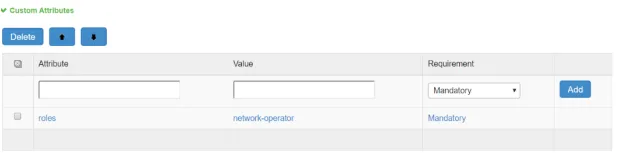
From the IPS Admin UI configure the custom attribute for Role based authorization as shown below.