
Retrieving the Authentication DSID
The Data Set Identification (DSID) is required for API use.
The following CURL command format uses the DSID to query the REST API server:
curl -v --cookie "DSID=<value>" <api_request_url>The DSID can be retrieved in two ways:
- Using the nZTA API, see Retrieving the DSID Using the API.
- Using a browser, see Retrieving the DSID Using a Browser.
Retrieving the DSID Using the API
You can use the following code to get a DSID token to use across all API calls:
def login(url,username,password):
    tenant_url = url
    return_dict = {'status': 0}
    global user_session, dsid
    login_URL = tenant_url + '/login/admin'
    data = {
        'username': username,
        'password': password,
        'realm': 'ZTA Admin Users',
        'btnSubmit': 'Submit',
        }
    user_session = requests.session()
    r = user_session.get(url=login_URL, verify=False)
    dssignin = user_session.cookies.get('DSSIGNIN')
    data = {'username': username,'password': password,'realm': 'ZTA Admin Users','btnContinue':
     'Continue the session'}
    login_cgi = url + '/dana-na/auth/' + dssignin + '/login.cgi'
    print login_cgi
    r = user_session.post(url=login_cgi, verify=False, data=data)
    print('login status code: ', +r.status_code)
    print('Login_data: ', user_session.cookies)
    d = str(r.content)
    if 'Continue the session' in d:
        formdatastr = xsauth = None
        try:
            p = r'.*name="FormDataStr" value="(.*?)">'
            x = re.findall(p, d)
            formdatastr = x[0]
        except IndexError:
            print 'Error: unable to get FormDataStr value'
        try:
            p = r'.*name="xsauth" value="(.*?)"'
            x = re.findall(p, d)
            xsauth = x[0]
        except IndexError:
            print 'Error: unable to get xsauth value'
        data = {'FormDataStr': formdatastr, 'xsauth': xsauth,
                'btnContinue': 'Continue the session'}
        login_cgi = url + '/dana-na/auth/' + dssignin + '/login.cgi'
        r = user_session.post(url=login_cgi, verify=False, data=data,
                              allow_redirects=True)
    dsid = user_session.cookies.get('DSID')
    print ('DSID: ', dsid)
    cookies["DSID"]=dsid
    if dsid is None:
        raise Exception('LoginError: Unable to get DSID cookie')
            # self.cookie = dsid
    session = user_session
After the DSID is set in the cookies (refer to code dsid = user_session.cookies.get('DSID')) use that session for all other API Calls.
You can use the following CURL command format uses the DSID to query the REST API server:
curl -v --cookie "DSID=<value>" <api_request_url>The following code demonstrates how to get a list of secure access policies using the API. It updates the cookie information for DSID from the above code.
def get_secure_access_policies():
    input_payload = {"type": "application"}
    request_uri = host_url + api_version + "policies/secure-access-policies"
    output = requests.get(request_uri, params=input_payload, cookies=cookies)
    status_code = output.status_code
    response_json = output.json()
    print response_json
Retrieving the DSID Using a Browser
You can use a browser to access the DSID. The procedure below describes the process for the Chrome browser, but any browser that offers similar tools can also be used.
- Start the nZTA user interface in the Chrome browser.
The home page appears.
- Right-click the main map, and select Inspect from the context menu.
The screen divides horizontally and the element view appears to the right of the screen.
In the Edge browser, you click the ... control, and then click Other Tools > Developer Tools. In the Firefox browser, you right-click and select Inspect Element from the context menu.
- In the element view, select the Network tab.
- Select an element from the list of elements (on the left of the tab). For example, login, admin or subscriptions.
A tab bar appears (on the right of the tab).
- Select the Cookies tab.
A list of cookies for the page appears.
- For the DSID entry, copy the DSID value and retain this value for future use. For example:
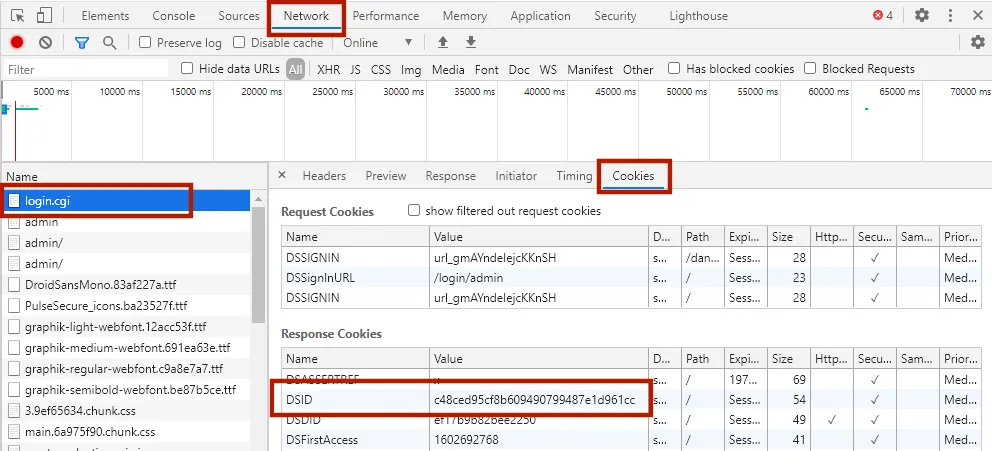
Element View in Chrome Browser
You can use the following CURL command format uses the DSID to query the REST API server:
curl -v --cookie "DSID=<value>" <api_request_url>