
Upgrading from Non-Secure Boot to Secure Boot
The upgrade process for hardware appliances involves uploading the 22.8R2 package, importing logs and configurations, converting MBR to GPT partitions, and transitioning from Legacy BIOS to UEFI.
Note
- For hardware appliances: - Upgrade is supported only on ISA6000/ISA8000 Hardware Appliances for ICS releases from 22.7Rx version to 22.8R2 version. - Upgrade does not support rollbacks to non-Secure Boot releases (22.7x or older). However, in future rollback from future Secure Boot releases to previous 22.8R2 releases (Secure Boot releases) would be supported. - The factory reset partition will be updated to 22.8R2 version during the upgrade process.
- Only fresh deployment of 22.8R2 is supported on VMware.
- Secure boot functionality is not supported on IPS.
- Change Personality is not supported in 22.8R2.
- TPM 2.0 is enabled by default on ISA Hardware Appliances.
- ISA Hardware Appliances with TPM 2.0 not enabled does not support upgrade to 22.8R2 version and any secure boot versions. Please reach out to Ivanti support to validate if your appliance has TPM enabled or not.
- The upgrade/fresh deployment for 22.8R2 can take more time when compared with non-secure boot versions.
- Contact Ivanti support if the hardware appliance becomes non-functional during the upgrade process.
To upgrade from non-Secure Boot 22.x release to Secure Boot newer 22.8R2 release:
- Log into the Admin portal.
- Upload the 22.8R2 package using standard upgrade process. For details, see ICS Administration Guide.
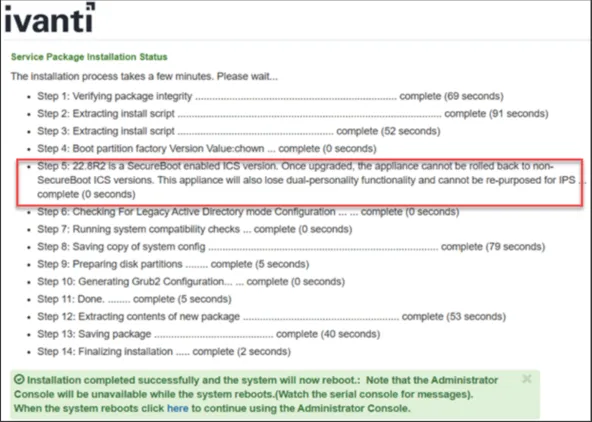
The system performs the following actions, which requires multiple reboots as part of the upgrade.
- All the logs, configs are imported from previous non-Secure Boot to Secure Boot supported 22.8R2 release builds.
- Converts MBR to GPT partitions.
- Legacy BIOS is converted to UEFI
- For ISA6000, 2-stage UEFI upgrade process. Admin can expect at least two additional reboots in this case.
- For ISA8000, single-stage UEFI upgrade process. Admin can expect one additional reboot in this case.
- Factory Reset partition will be upgraded from previous 22.x release build to the Secure Boot 22.8R2 release build.
After the upgrade to the Secure Boot build (detailed above) is complete, the images on an ICS would look like the following:

If you decide NOT to upgrade to the first Secure Boot release, i.e. 22.8R2, but wait till the next available release, then you need to upgrade in the following order: - First upgrade to 22.8R2 Secure Boot release as described above. - Next upgrade to the newer version.