
Lock Screen Message Configuration
Displays a message and asset tag info on the login and lock screens. This is for supervised devices using iOS 9.3 or supported newer versions.
Creating a Lock Screen Message configuration
Procedure
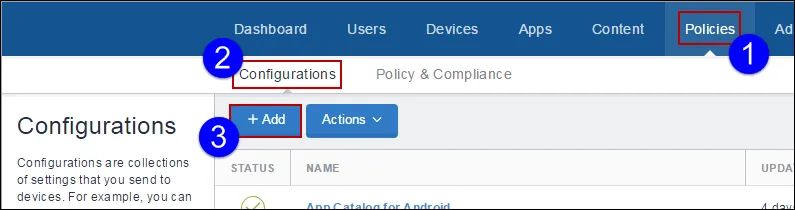
- Select Configurations.
- Click + Add.
Type lock in the search field, and then click the Lock Screen Message configuration:
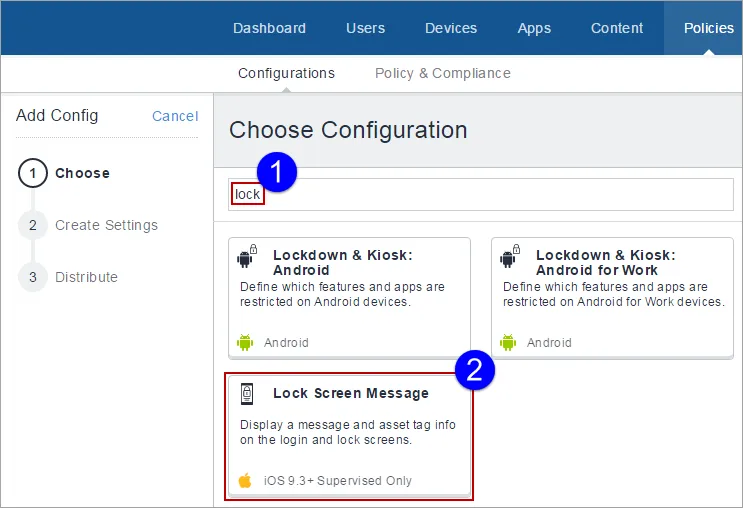
The Lock Screen Message Configuration details page appears. Configure the settings on this page. Refer to the table in the section Lock Screen Message Configuration Settings for guidance on the values.
- Click Next to configure the distribution settings, and then click Done.
Lock Screen Message Configuration settings
Setting | What To Do |
|---|---|
Name | Enter a name that identifies this configuration. |
Description | Enter a description that clarifies the purpose of this configuration. |
Lock Screen Footnote | This text appears on the login window and lock screen. |
Asset Tag Information | This text appears at the bottom of the login window and lock screen. |
For more information, see How to create a configuration.