
Tenable Web Application Scanning (WAS) Connector Guide
Summary: How to set up and use the Tenable Web Application Scanning (WAS) connector in Ivanti Neurons.
Tenable Web Application Scanning (WAS) Connector Overview
Tenable Web Application Scanning (WAS) is a cloud-based web application security scanner that identifies vulnerabilities through automated crawling and testing of custom web applications. Ivanti Neurons provides an API-based connector that integrates Tenable WAS vulnerability information into the Ivanti Neurons platform for further prioritization and accessibility, without affecting existing functionality for actions on applications and application findings.
Connector Configuration in Ivanti Neurons
Setting Up the Tenable WAS Connector
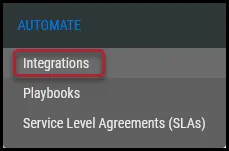
- Navigate to the Automate > Integrations page.
- Using the search bar in the upper-right corner of the Integrations page, type Tenable to find the connector.
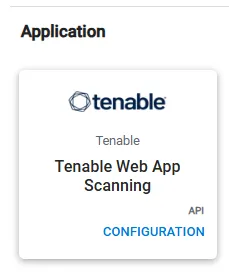
- Locate the Tenable WAS card under Applications and click Configuration.
- In the new window under Connection, complete the following required fields.
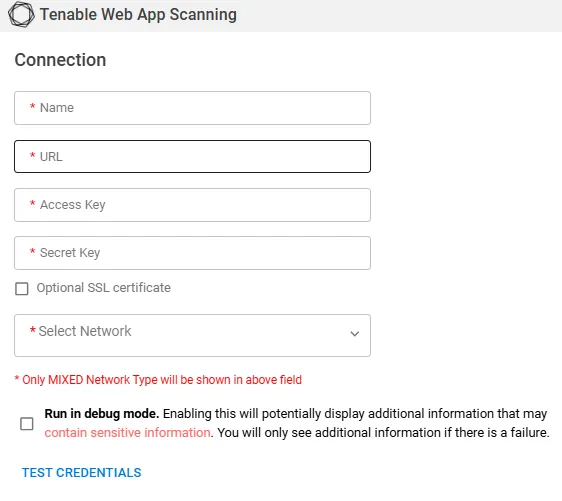
- Name: The connector’s name. Displayed on the connector card.
- URL: Enter the URL of the Tenable Web App Scanning instance.
- Access Key: Enter the access key used to authenticate with Tenable Web App Scanning.
- Secret Key: Enter the secret key associated with the access key.
- Optional SSL certificate: Select to provide an SSL certificate for the connection.
- Select Network: Select the network for the connector. Only networks with the MIXED network type are available.
- Run in debug mode: Select to display additional information if the connection fails. Debug information may contain sensitive information.
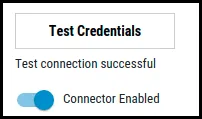
Click Test Credentials to verify if the credentials are correct and have access to make API calls to Tenable WAS.
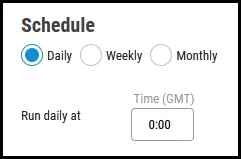
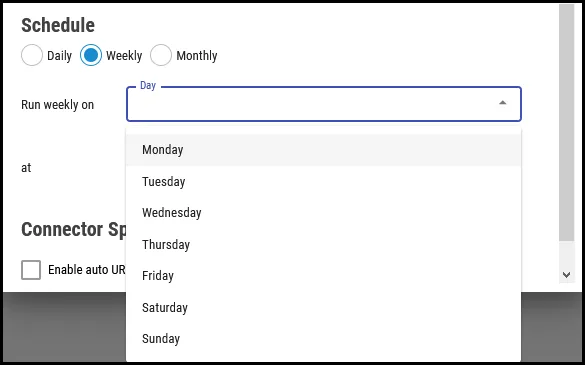
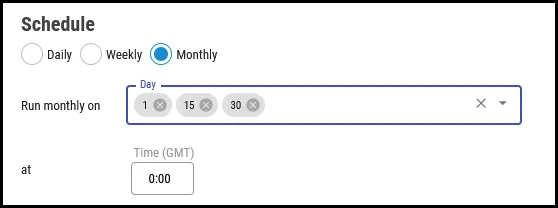
In the Schedule section, configure the desired schedule for the connector to retrieve results from the Tenable instance. All time selections are based on 24-hour GMT time. The following schedules are available.
Daily: Configures the connector to run at a set daily interval.
Weekly: Configures the connector to run on a specific day or multiple days of the week at a specific time.
Monthly: Configures the connector to run on a specific day or days of the month at a specific time on those days.
Optionally you can turn on Create assets that do not have vulnerabilities import and create assets even when no vulnerabilities are associated with them. Click Save to create the connector.
Once saved, the connector is now visible on the Integrations page under Currently Configured Integrations.
Tenable Web App Scanning field mapping
The Tenable Web App Scanning connector maps asset and finding data retrieved from Tenable Web App Scanning to the corresponding fields in Ivanti Neurons.
Asset field mapping
Tenable Web App Scanning field | Ivanti Neurons field |
|---|---|
id | TenableWAS Application ID |
fqdn | Application Name |
fqdn | Application URL |
ipv4 | IPAddress |
first_seen | First Discovered On |
last_seen | Last Discovered On |
uuid | TenableWAS Application ID |
Finding field mapping
Tenable Web App Scanning field | Ivanti Neurons field |
|---|---|
finding_id | TenableWAS FindingId |
Url | Location |
output | Specific information |
state | TenableWAS State |
severity | TenableWAS Severity |
first_found | First Discovered On |
last_found | Last Discovered On |
plugin->id | TenableWAS PluginId |
plugin->risk_factor | TenableWAS Plugin RiskFactor |
plugin->type | TenableWAS Plugin Type |
plugin->intel_type | TenableWAS Plugin Intel Type |
plugin->name | TenableWAS Plugin Name |
plugin->publication_date | TenableWAS Plugin Publication Date |
plugin->modification_date | TenableWAS Plugin Modification Date |
plugin->solution | Solution |
plugin->synopsis | Synopsis |
plugin->description | Description |
plugin->cve | TenableWAS Plugin CVE |
plugin->cwe | TenableWAS Plugin CWE |
plugin->exploit_by_malware | TenableWAS Plugin Exploit By Malware |
plugin->vpr->cvss_impact_score_predicted | TenableWAS Plugin VPR CVSS Impact Score Predicted |
plugin->vpr->cvss3_impact_score | TenableWAS Plugin VPR CVSS3 Impact Score |
plugin->vpr->product_coverage | TenableWAS Plugin VPR Product Coverage |
plugin->cvss2_base_score | TenableWAS Plugin CVSS2 Base Score |
plugin->cvss3_base_score | TenableWAS Plugin CVSS3 Base Score |
Tenable Web App Scanning API endpoints
The Tenable Web App Scanning connector uses the following API endpoints:
Description | Method | Endpoint |
|---|---|---|
Authentication | GET | /was/v2/configs/filters |
Scans | GET | /scans |
Asset Export | GET | /asset/exports |
Vulnerability Export | GET | /was/v1/exports/vuln |
Asset Export Status | GET | /asset/exports/{asset_export_uuid}/status |
Vulnerability Export Status | GET | /was/v1/exports/vuln/{vuln_export_uuid}/status |
Download Asset Chunk | GET | /asset/exports/{asset_export_uuid}/chunk/1, 2, 3 |
Download Vulnerabilities Chunk | GET | /was/v1/exports/vuln/{vuln_export_uuid}/chunk/1, 2, 3 |
For more information, please visit Add web application