Creating TrafficScript Functions Using Java Extensions
Java Extensions can be used to do more than just process traffic. You can use Java Extensions to implement new functions in TrafficScript, thus extending the TrafficScript language.
The following Java Extension implements the Soundex algorithm, which converts a name or other string into a phonetic representation.
For more information about Soundex, see http://en.wikipedia.org/wiki/Soundex.
You can use the algorithm to test if two words sound the same, as shown in the following example:
import java.io.IOException;
import javax.servlet.*;
import com.zeus.ZXTMServlet.ZXTMServletRequest;

public class Soundex extends GenericServlet {
private static final long serialVersionUID = 1L;

public void service( ServletRequest req, ServletResponse res )
throws IOException
{
String[] args = (String[])req.getAttribute( "args" );
String result = doSoundex( args[0] );
((ZXTMServletRequest)req).setConnectionData( "soundex", result );
}

static String soundex = "01230120022455012623010202";
String doSoundex( String s ) {
s = s.toUpperCase();
StringBuilder r = new StringBuilder();

char last = '0';
if( s.length() > 0 ) last = s.charAt( 0 );
r.append( last );
for( int i = 1; i < s.length(); i++ ) {
int j = s.charAt( i )-'A';
char next = ( j >= 0 && j < soundex.length() ) ?
soundex.charAt( j ) : '0';
if( next != last && next != '0' ) {
r.append( next ); last = next;
}
if( r.length() >= 4 ) break;
}
while( r.length() < 4 ) r.append( '0' );
return r.toString();
}
}
This Java Extension is based on the simple GenericServlet API. The Java Extension should be called (initiated) from TrafficScript, as shown below:
java.run( "Soundex", $word );
Java Extensions cannot return values in the traditional sense.
The Java Extension inspects the first argument and then applies the Soundex algorithm.
The Servlet API does not provide a way for a servlet to return a value to its caller; you need to use the ZXTMServletRequest.setConnectionData() method to set a local connection variable that the TrafficScript rule can then use.
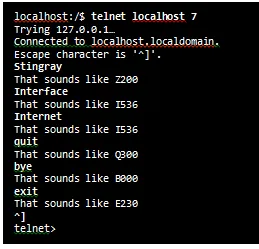
The following TrafficScript request rule, assigned to run every time on a simple client-first virtual server, illustrates the use of this Java Extension:
sub soundex( $word ) {
java.run( "Soundex", $word );
return connection.data.get( "soundex" );
}

$word = string.trim( request.getLine() );

request.sendResponse( "That sounds like " . soundex( $word ) . "\n" );
The following illustrates the rule in use: