
Appendix: Deploying for Redundancy
Deploying High Availability for the Software Services Director
To create a high availability installation of the software form-factor Services Director, you require:
- Two or more host machines (either virtual or physical) running supported versions of Ubuntu/CentOS Linux. Each will contain a software form-factor Services Director.
- Two or more clustered software form-factor Services Directors, that are installed and licensed. These can operate in either an Active/Passive or an Active/Active configuration.
- A MySQL database for the Services Directors. Replication of this database is recommended, else the database will be a single point of failure.
- Two clustered front-end virtual Traffic Managers (vTMs) in an Active/Passive configuration. These vTMs ensure that manually-issued requests to the REST API of the Services Director will be directed to an Active Services Director. The configured vServer and pools on these vTMs control how traffic reaches your Services Directors.
- A vTM Traffic IP (TIP) address, which acts as the Service Endpoint Address (SEA) for manually-issued REST API requests to the Services Directors.
The TIP/SEA can be in a private network behind a Network Address Translation (NAT) device. Where this is the case, the external SEA is used for all service requests.
Each element of your Services Director installation can be deployed as required within your network, using any combination of virtual machines, physical machines and data centres. Physical diversity of elements (for example, spreading elements across data centres) is likely to increase the resilience of the installation.
The Services Director and its front-end vTMs can be in a private network behind a NAT device. However, the vTMs that will be added to the estate of the Services Director at a later stage cannot be behind a NAT.
Technologies allowing routable connections between native IP addresses in disparate networks (for example, Virtual Private Networks) are supported.
After you have completed your high availability installation of the software form-factor Services Director, you can add Traffic Managers to the estate of your Services Directors, see Populating the Estate of the Services Directors.
You must ensure that the master password for the Services Directors is recorded securely. This is required during any recovery from failure, see Disaster Recovery for the Software Services Director.
Example Deployment: Active/Passive Services Directors
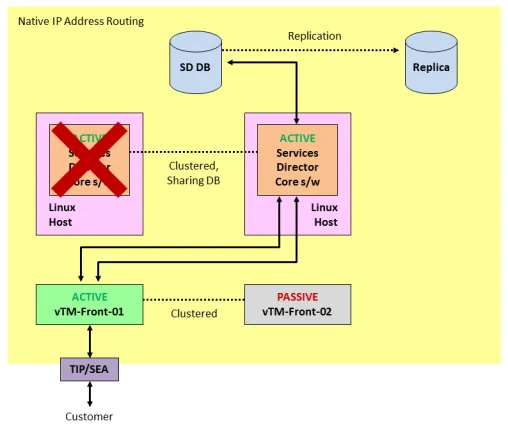
A network topology with Active/Passive Services Directors is shown below. Other network topologies are supported.
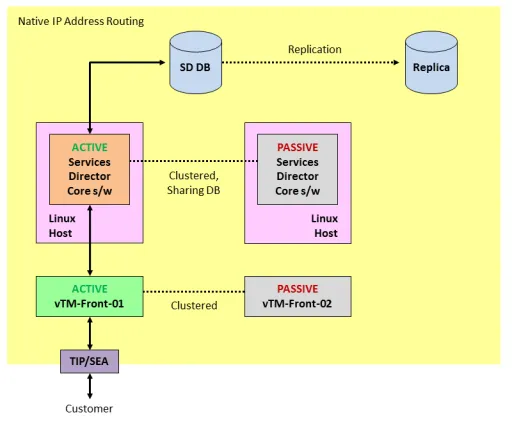
In this example, there are:
- Two clustered software form-factor Services Directors, each of which is installed on its own Linux machine.
- A MySQL database that is shared by the clustered Services Directors. This database is replicated.
- Two clustered Virtual Traffic Managers (vTMs), which act as a resilient front-end to the Services Directors.
- A known Service Endpoint Address (SEA) for the clustered Services Directors.
- A customer who wants to manually send REST API requests to the clustered Services Directors using the SEA.
Each element of your Services Director installation can be deployed as required within your network, using any combination of virtual machines, physical machines and data centres. Physical diversity of elements (for example, spreading elements across data centres) is likely to increase the resilience of the installation. Technologies allowing routable connections between native IP addresses in disparate networks (for example, Virtual Private Networks) are supported.
In this example, the Services Directors are required to act as an Active/Passive high availability pair. That is, all requests must go exclusively to the Active Services Director until it fails, at which point the Passive Services Director becomes the Active node. To achieve this Active/Passive configuration, a vServer and two pools are required on the Active front-end vTM:
- A default pool identifies the management address/port for the first Services Director only.
- A failure pool for the first pool identifies the management address/port for the second Services Director only.
A default monitoring mechanism for the pools is provided. This is ping-based, and operates at a machine level. You may choose to replace this with your chosen monitoring mechanism. Refer to the Ivanti Virtual Traffic Manager documentation.
The Active front-end vTM raises a Traffic IP (TIP) address, which acts as the SEA for the clustered Services Directors.
The customer sends a request to the SEA, which reaches the Active vTM. This is routed to the Active Services Director to process the request, and a response is returned to the customer.
The SEA for the clustered Services Director can be in a private network behind a NAT device. However, the vTMs that will be added to the estate of the Services Director at a later stage cannot be behind a NAT.
In this example, both Services Directors are configured to perform licensing, metering and monitoring.
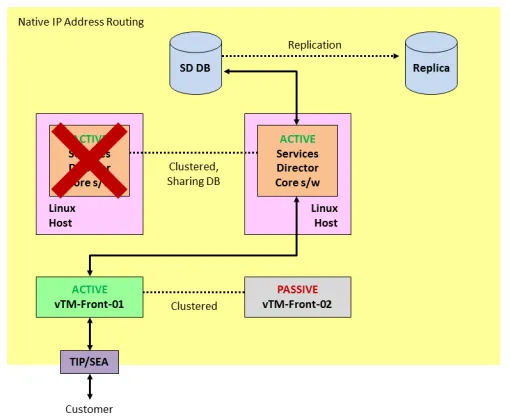
In the event of the failure of the Active Services Director:
- The front-end vTM routes all requests to the Passive Services Director, which becomes the new Active Services Director.
- All requests are routed to the Active Services Director until it fails.
- Licensing, metering and monitoring are performed by the remaining Services Director only.
- The customer continues to manually issue REST API requests to the Services Director using its SEA.
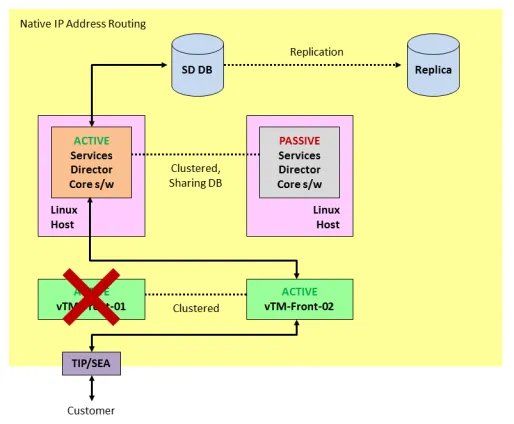
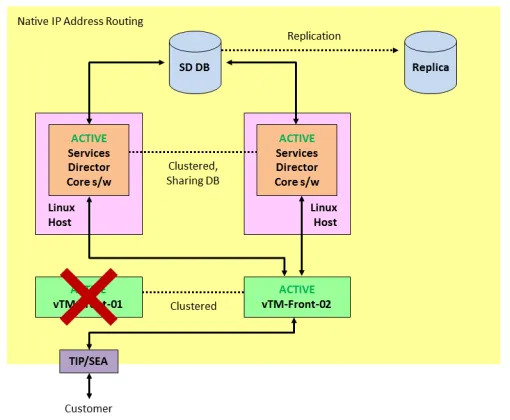
In the event of the failure of the Active front-end vTM:
- The Passive front-end vTM becomes the Active front-end vTM. This is configured with the same vServer pools as the failed front-end vTM.
- The new Active front-end vTM raises a TIP, which matches the SEA for the clustered Services Directors.
- The customer continues to manually issue REST API requests to the Services Director using its SEA.
- The new Active front-end vTM continues to route all requests to the Active Services Director.
- Licensing, metering and monitoring on the Services Directors are unaffected.
In the event of a failure of the main Services Director database, manually switch the Services Director configuration to use the replica database. note: Depending on database activity and the replication schedule, the replica may be behind the main database; re-apply any lost configuration changes. When the main database becomes available again (or you have replaced it with a new database based on the replica), manually switch the Services Director configuration back, and re-apply any lost configuration changes.
Example Deployment: Multiple Active Services Directors
A network topology with two Active Services Directors is shown below. Additional Active Services Directors can be used if required. Other network topologies are also supported.
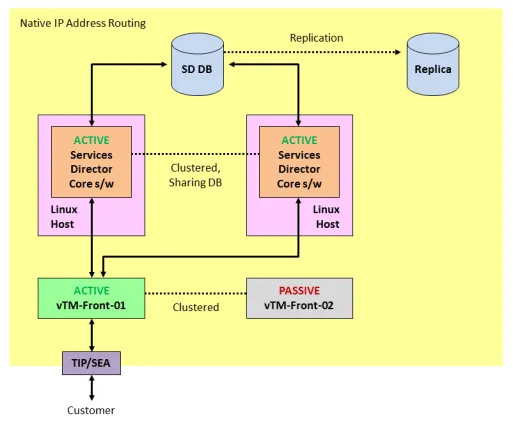
In this example, there are:
- Two clustered software form-factor Services Directors, each of which is installed on its own Linux machine.
Additional Services Directors can be added to the cluster if required.
- A MySQL database that is shared by the clustered Services Directors. This database is replicated.
- Two clustered Virtual Traffic Managers (vTMs), which act as a resilient front-end to the Services Directors.
- A known Service Endpoint Address (SEA) for the clustered Services Directors.
- A customer who wants to manually send REST API requests to the clustered Services Directors using the SEA.
Each element of your Services Director installation can be deployed as required within your network, using any combination of virtual machines, physical machines and data centres. Physical diversity of elements (for example, spreading elements across data centres) is likely to increase the resilience of the installation. Technologies allowing routable connections between native IP addresses in disparate networks (for example, Virtual Private Networks) are supported.
In this example, requests are load-balanced between the Services Directors. If one Services Director fails, all requests will be routed to the remaining Services Director. To achieve this configuration, a single vServer and pool is required on the Active front-end vTM. This identifies the management address/ports for both Services Directors, and operates according to the chosen load-balancing algorithm. For example, "round-robin".
A default monitoring mechanism for the pool is provided. This is ping-based, and operates at a machine level. You may choose to replace this with your chosen monitoring mechanism. Refer to the Ivanti Virtual Traffic Manager documentation.
The Active front-end vTM raises a Traffic IP (TIP) address, which matches the SEA for the clustered Services Directors.
The customer sends a request to the SEA, which reaches the Active vTM. This is routed to a Services Director according to the chosen load-balancing algorithm. The Services Director processes the request, and a response is returned to the customer.
The SEA for the clustered Services Director can be in a private network behind a NAT device. However, the vTMs that will be added to the estate of the Services Director at a later stage cannot be behind a NAT.
In this example, both Services Directors are configured to perform licensing, metering and monitoring.
In the event of the failure of any Services Director:
- The front-end vTM routes all requests away from the failing Services Director. In this case, to the other Services Director.
- Licensing, metering and monitoring are performed by the remaining Services Director only.
- The customer continues to manually issue REST API requests to the Services Director using its SEA.
In the event of the failure of the Active front-end vTM:
- The Passive front-end vTM becomes the Active front-end vTM. This is configured with the same vServer pools as the failed front-end vTM.
- The new Active front-end vTM raises a TIP, which matches the SEA for the clustered Services Directors.
- The customer continues to manually issue REST API requests to the Services Director using its SEA.
- The new Active front-end vTM routes all requests to the assigned Services Directors.
- Licensing, metering and monitoring are unaffected.
In the event of a failure of the main Services Director database, manually switch the Services Director configuration to use the replica database. note: Depending on database activity and the replication schedule, the replica may be behind the main database; re-apply any lost configuration changes. When the main database becomes available again (or you have replaced it with a new database based on the replica), manually switch the Services Director configuration back, and re-apply any lost configuration changes.
Populating the Estate of the Services Directors
Once your high availability installation is complete, you can start adding vTMs to the estate of the Services Directors. That is:
- Externally-deployed vTMs, see Registering Externally-Deployed Traffic Managers.
- vTMs that are deployed using an instance host, see Using an Instance Host with a Software Services Director.
- Cloud-based vTMs, such as those deployed on AWS.
Cloud-based vTMs are not supported when the Services Director is in a private network behind a NAT device.
For example (using generalisations to represent your chosen Services Director configuration):
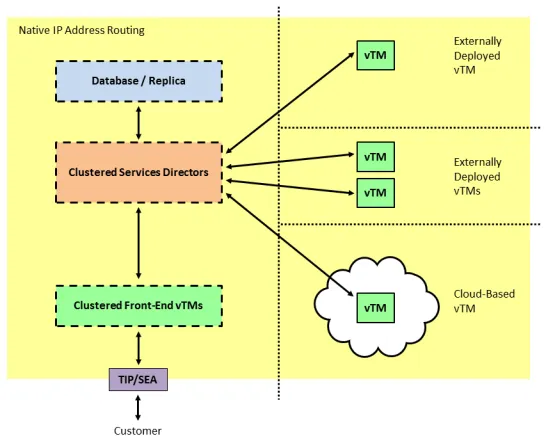
You create the required resources using manually-issued REST API requests to the SEA of the Services Directors.
You can use any combination of virtual machines, physical machines and data centers to achieve this. Physical diversity of elements (for example, spreading elements across data centers) is likely to increase the resilience of the installation.
The Services Director and its front-end vTMs can be in a private network behind a NAT device. However, the vTMs that will be added to the estate of the Services Director at a later stage cannot be behind a NAT.
Technologies allowing routable connections between native IP addresses in disparate networks (for example, Virtual Private Networks) are supported.
Disaster Recovery for the Software Services Director
The software form-factor Services Director does not support:
- Scheduled backups of the Services Director configuration.
- Scheduled backups of individual vTM configurations.
If your Services Director installation is lost, you will require the MySQL database (or its replica) to recover the installation. This will enable the Services Director's configuration, including records of all vTMs in its estate, to be recovered.
The master password for the Services Directors is required during any recovery from failure.
The Services Director MySQL database includes:
- Software licenses for the software form-factor Services Directors.
- All information about the vTMs in the estate of the Services Directors, including administration credentials.
- All information for any instance hosts known to the Services Directors.
- Universal FLA licenses for vTMs in your estate.
The Services Director MySQL database does not include:
- Any information about the front-end vTMs; you will need to deploy and configure these manually.
- Any Legacy FLA licenses for older vTMs in your estate.
- Any vTM images that you had loaded to enable vTM deployments using an instance host.
For example, if all of your Services Directors are lost:
- Recreate all elements (and clustering) of your original installation except for the MySQL database.
- Configure the Services Directors to use the existing MySQL database (or its replica). It is recommended that you establish a database replication regime for your chosen database.
- Re-install any Legacy FLA licenses as required.
- Configure the front-end vTMs to match your original installation.
- (Optional) Re-install any instance host and vTM images as required. You must do this before further vTMs can be deployed.
The recovered installation will be broadly similar to your original, but may require specific minor configuration.
Deploying High Availability for the Services Director VA
To create a high availability installation of the Services Director VA, you must:
- Install a Primary and a Secondary Services Director VA. See the Services Director Getting Started Guide.
The Services Director VAs will automatically act as an Active/Standby HA pair, and automatically create the required MySQL database.
You must ensure that the master password for the Services Directors is recorded securely. This is required during any recovery from failure, see Disaster Recovery for the Software Services Director.
- Specify a Service Endpoint Address (SEA) for the HA pair. The Services Director VA is always accessed by its SEA.
The SEA for the Services Director HA pair can be in a private network behind a NAT device. However, the vTMs that will be added to the estate of the Services Director at a later stage cannot be behind a NAT.
- (Optional) Add one or more Legacy FLA licenses if required.
Universal FLA licenses are included in the Services Director VA product.
- (Optional) Install an instance host if required.
Your Services Director VAs can be deployed as required within your network. Each element of your Services Director installation must be able to route to each other element using native IP address routing only. The use of Network Address Translation (NAT) between the Services Director and other elements is not supported; technologies allowing routable connections between native IPs in disparate networks (for example, Virtual Private Networks) may be used.
If your Active Services Director VA fails, you must manually failover the Standby Services Director VA so that it becomes Active. The customer continues to access the Services Director VA using its SEA. Once you have performed all repairs, you can revert to the original Services Director VA. See the Services Director Getting Started Guide.
After you have completed your high availability installation of the Services Director VAs, you can add Traffic Managers to the estate of your Services Directors. As with the Services Director VA installation, physical and virtual diversity is likely to increase the resilience of your estate. For example:
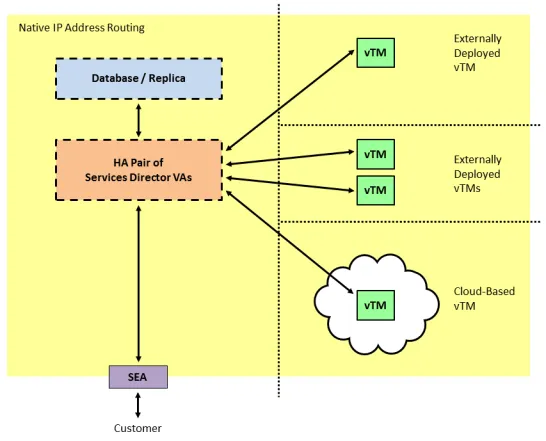
You can create backups for various configurations from the Services Director VA:
- The configuration of the Services Director VA can be backed up automatically to a local or remote location according to a user-defined schedule.
- The configuration of individual vTM clusters can also be backed up automatically according to a user-defined schedule.
You can use these backups to recreate a Services Director VA installation in the event of a failure.
For example, if your Services Director installation is lost:
- Create a new Primary Services Director VA, and choose to create it from a backed up configuration.
- Create a new Secondary Services Director VA, connecting it to the recovered Primary.
Do not create this Services Director from a backup; the configuration is automatically retrieved from the Primary Services Director VA.
- Recreate any configuration that is not included in the restore. For example, re-load any required vTM images that were previously used for deployments using an instance host.
- (Optional) Reload any Legacy FLA licenses if required.
- View the vTMs in the estate of the Services Director VA, and ensure they are licensed correctly.
- Recover the configuration of the vTM clusters from their backups.
The master password for the Services Directors is required during any recovery from failure.
The recovered installation will be broadly similar to your original, but may require specific minor configuration.
See the Services Director Getting Started Guide for details of all processes listed above.