
System Overview
Introduction
The ISA8500 features a unique and highly optimized design for low wattage processor platforms. It is equipped with a high-efficiency low noise power supply. High-performance fans provide ample optimized cooling.
Front view

Rear view - ISA8500C

Rear view - ISA8500F

For added system security, the USB ports have been disabled.
LED Control Panel
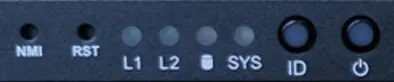
The control panel located on the front of the ISA8500 chassis includes power control buttons and status LEDs. This section describes the LED indicators and the appropriate responses.
Control Panel Buttons
The control panel includes a power on/off with LED button and a reset button.

Power: The main power switch is used to apply or remove power from the power supply to the server system. Turning off system power with this button removes the main power but keeps standby power supplied to the system. Therefore, you must unplug system before servicing.

Reset: The reset button is used to reboot the system.
Control Panel LEDs
The control panel displays five LEDs to monitor the system.

ID: Press the button to activate system identification

SYS LED: Alerts operator of several states, as noted in the table below:
LED Color | Status | Description |
|---|---|---|
Green | ON | System is operating normally. |
NA | OFF | System is not ready, may indicate: POST error; NMI error; Processor or terminator missing |
Amber | ON | Critical condition, may indicate: System fan failure; System temperature |
Amber | Blink | Non-critical condition, may indicate: - Redundant power module failure - Temperature and voltage issue - Chassis intrusion |

NMI: Press the button; server generates an NMI to the processor if multiple-bit ECC errors occur, which effectively halts the server.

LAN1: Associated with the Management port. It indicates network activity when flashing.

LAN2: Unused. Will always be off.

HDD: Indicates NVMe drive activity when flashing.
LED Color | Status | Description |
|---|---|---|
Green | ON | HDD locate |
| Blink | HDD access |
Amber | On | HDD fault |
Green/Amber | Blink | HDD rebuilding |
N/A | Off | No HDD access or no HDD fault. |

Power: Indicates power is being supplied to the system power supply. This LED should be illuminated when the system is operating.
LED Color | Status | Description |
|---|---|---|
Green | ON | System is powered on |
N/A | Off | System is not powered on |
RoT/BMC/Auth LEDs
| ID LED | SYS LED |
|---|---|---|
EC FW is broken or not exit | Off | Off |
Authenticating Images | Off | Off |
Recovering BMC Active Flash | Blinks Blue, 4 times per second | Blinks Green, 4 times per second |
Recovering BIOS Active Flash | Blinks Blue, 4 times per second | Blinks Green, 4 times per second |
BMC : AUTH pass after doing recovery BIOS : AUTH pass after doing recovery | Off | Off |
BMC : AUTH pass after doing recovery BIOS : AUTH pass | Off | Off |
BMC : AUTH pass BIOS : AUTH pass after doing recovery | Off | Off |
BMC : AUTH Fail | Blinks Blue, 1 time per second | Blinks Green, 1 time per second |
BIOS : AUTH fail( | Blinks Blue, 1 time per second | Blinks Amber, 1 time per second |
BMC : AUTH fail after doing recovery | Blinks Blue, 2 times per second [ON OFF OFF] | Blinks Green, 2 times per second [ON OFF OFF] |
BIOS : AUTH fail after doing recovery | Blinks Blue, 2 times per second [ON OFF OFF] | Blinks Amber, 2 times per second [ON OFF OFF] |
BMC : AUTH fail | Blinks Blue, 2 times per second [ON OFF OFF] | Blinks Green, 2 times per second [ON OFF OFF] |
BIOS : AUTH fail | Blinks Blue, 2 times per second [ON OFF OFF] | Blinks Amber, 2 times per second [ON OFF OFF] |
Management Port LEDs
The management port has two LEDs. The yellow LED indicates activity, while the link LED may be green, amber, or off to indicate the speed of the connection.
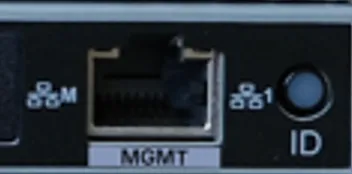
LED | Name | Color | Status | Description |
|---|---|---|---|---|
1 | 1 GbE Speed LED | Yellow | On | 1 Gbps data rate |
| | Green | On | 100 Mbps data rate |
| | N/A | Off | 10 Mbps data rate |
2 | 1 GbE Link / Activity LED | Green | On | Link between system and network or no access |
| | | Blink | Data transmission or reception is occurring |
| | N/A | Off | No data transmission or reception is occurring |
INT and EXT Port LEDs
Two LAN ports are located on the NIC card. Each Ethernet port has two LEDs.
LED | Name | Color | Status | Description |
|---|---|---|---|---|
1 | 10 GbE Activity LED | N/A | Off | No link |
| | Green | Blinking On/Off | Actively transmitting or receiving data |
2 | 10 GbE Link LED | N/A | Off | No link |
| | Yellow | On | Linked at slower than 10 Gbps |
| | Green | On | 10 Gbps link speed |
Air Flow Direction
The following table gives the air flow direction of the power supply fan and internal CPU fan.
Component | Air Flow Direction |
|---|---|
Power Supply Fan | To the rear of the unit |
Internal CPU Fan | To the rear of the unit |