
Admin > System Use Notification
1 min
Licence: Silver
Use the System Use Notification feature to create a customised system use notification that appears to administrators at the time of login, and requires administrators to accept terms of use before accessing the system.
Creating a system use notification
Procedure
- Select Admin > System Use Notification.
- Click Create Notification.
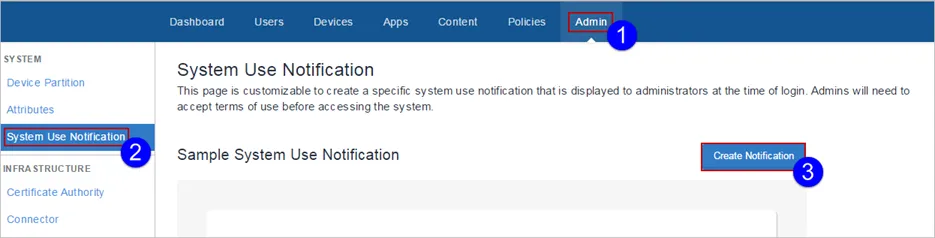
The System Use Notification Details page appears.
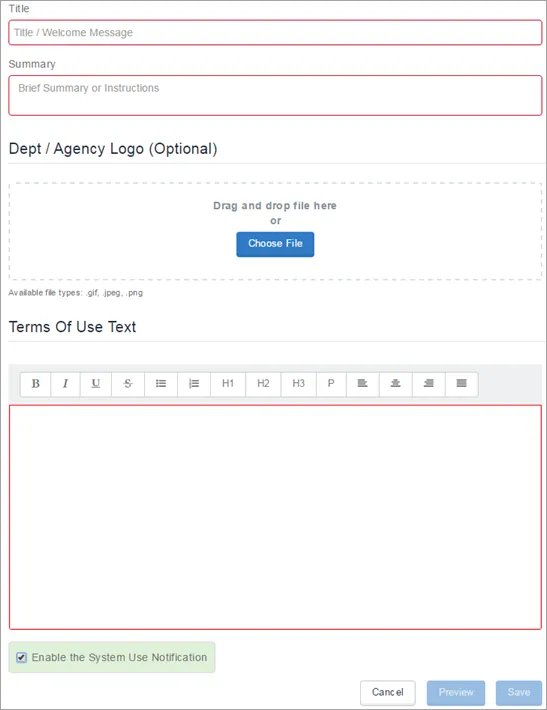
Enter a title in the Title field.
- Enter a summary or instructions in the Summary field.
- Choose a logo if desired.
- Enter terms of use text in the Terms of Use Text field. This is the text that the administrator will have to accept at login.
- Place a check mark in the Enable the System Use Notification check box to turn on the notification.
- Click Preview to invoke a preview of the system use notification.
- Click Save when you are satisfied with the system use notification.